Sunucun yedeğini kurup unut. Set up your server backups and forget them.
İlbir Sandık sunucularının yedeğini zamanında alır, şifreler, aynı veriyi bir kez saklar ve her yedeği doğrular. Yedek sayısı dolunca en eskisini kendisi siler; bir şey ters giderse sana haber verir. Sandik Backup takes your server backups on schedule, encrypts them, stores identical data once and verifies every backup. When the limit is reached it deletes the oldest itself, and it tells you when something goes wrong.
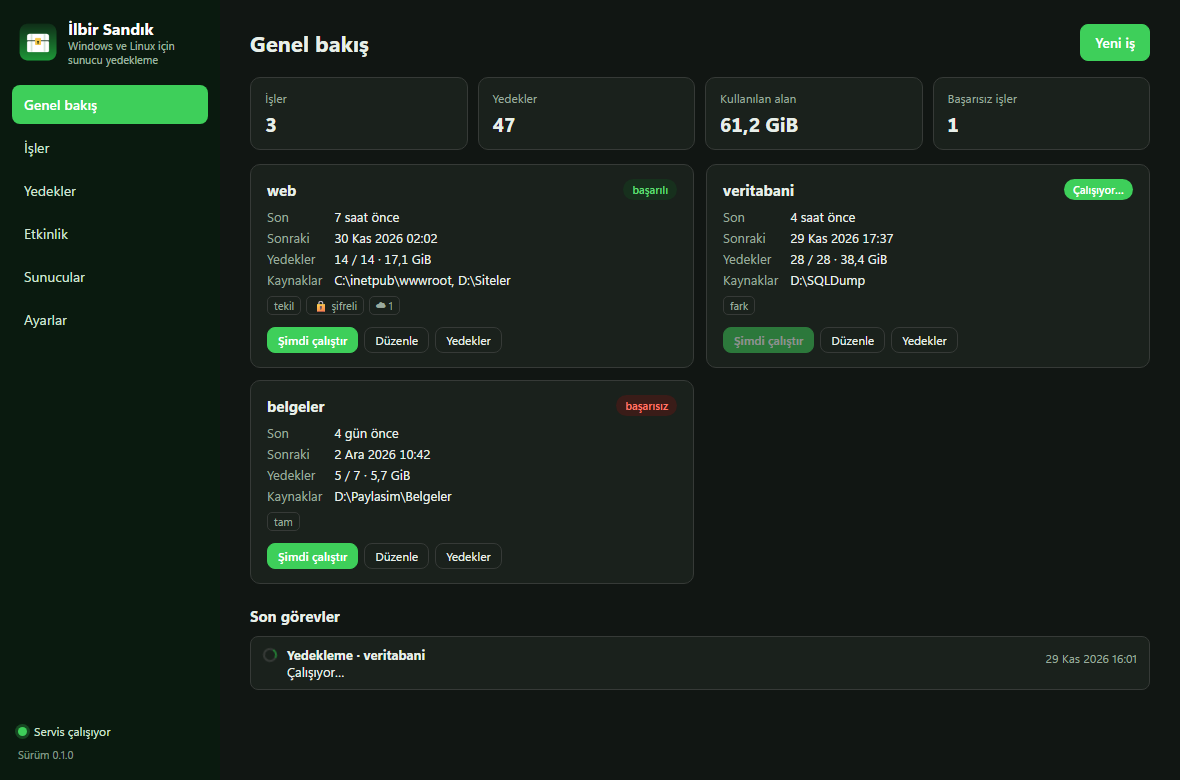
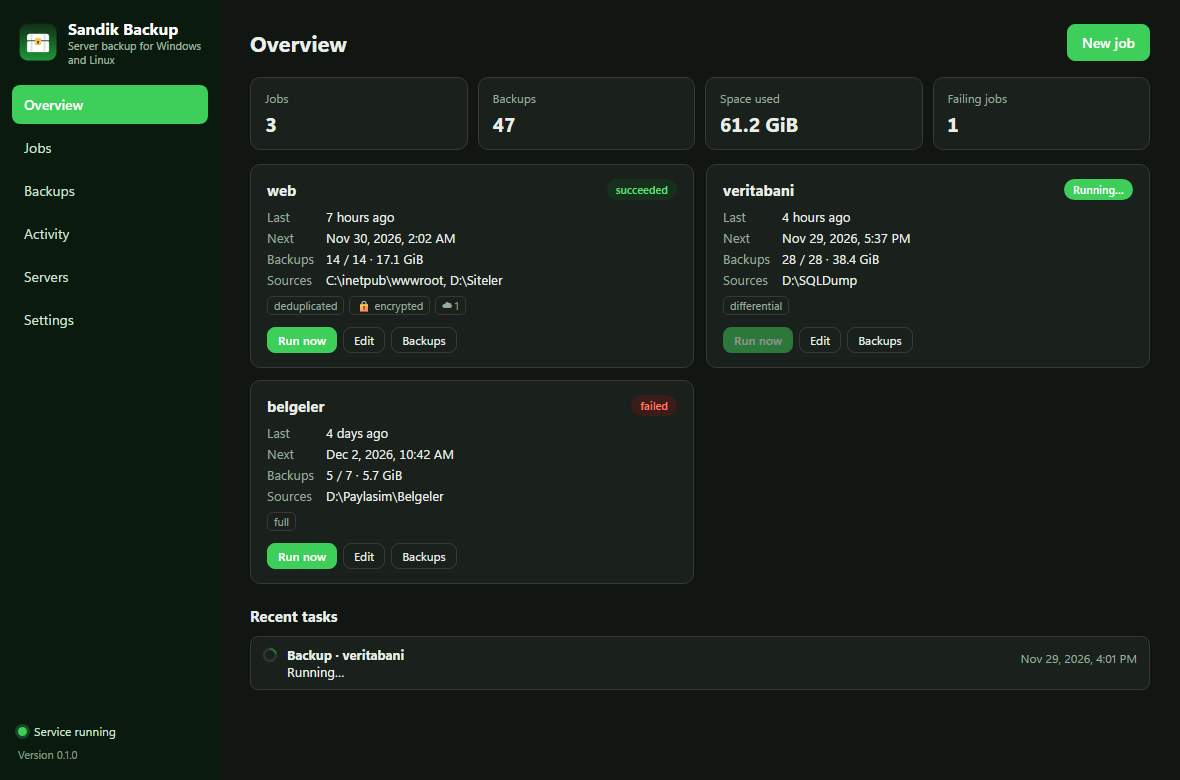
Bir yedekleme aracından beklediğin her şeyEverything you expect from a backup tool
Ücretsiz sürümde de tamamı açık. Yedekleme motoru iki sürümde aynı.All of it is on in the free edition too. The backup engine is the same in both editions.
ZamanlamaScheduling
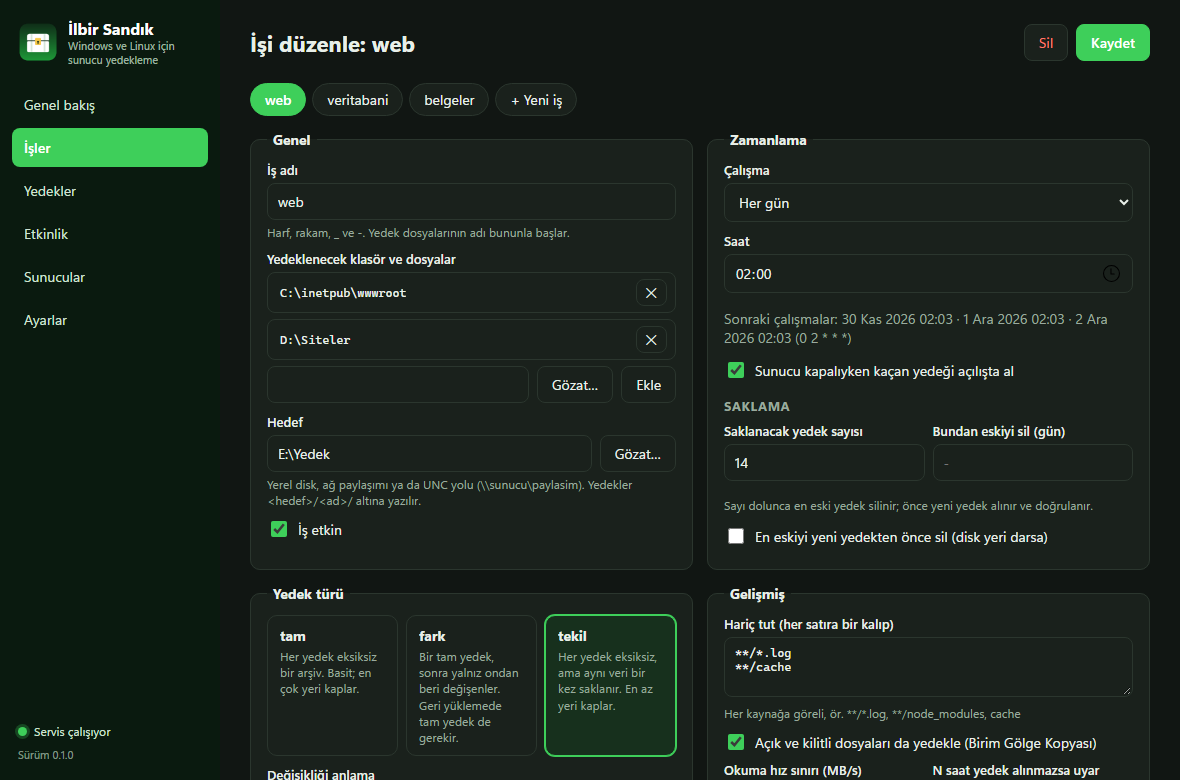
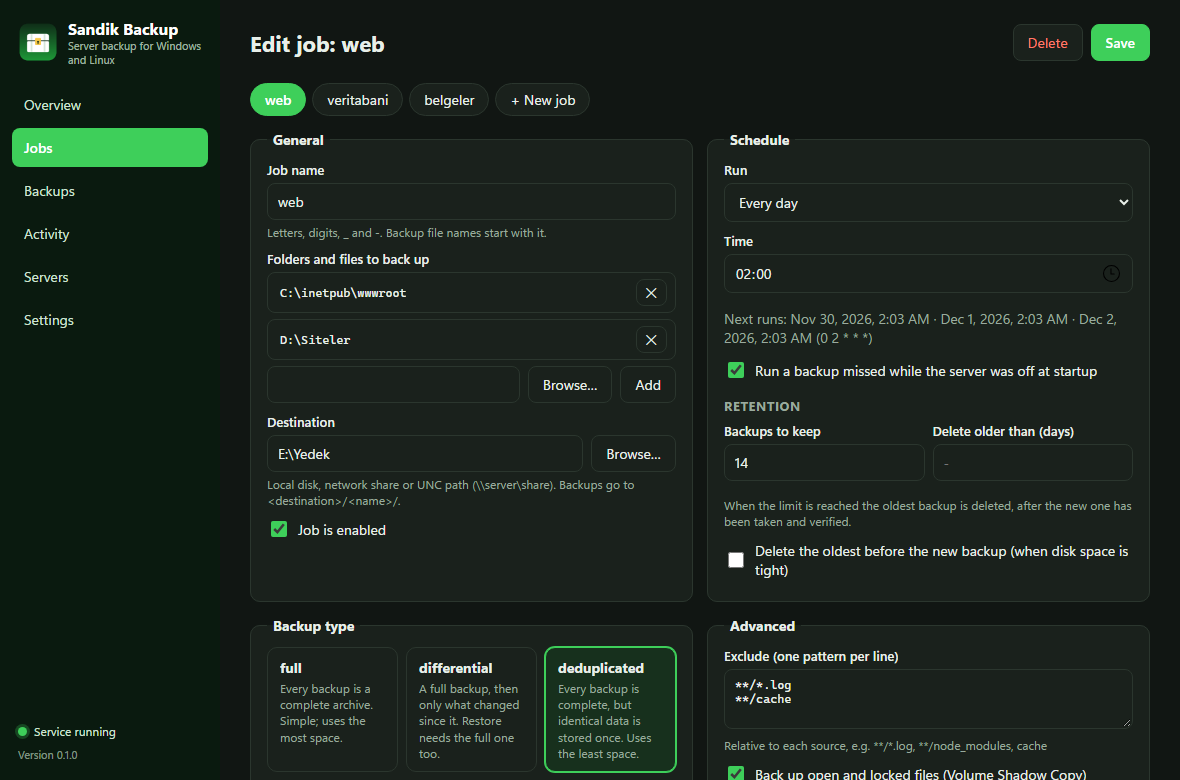
Her gün, her hafta ya da birkaç saatte bir; cron bilmeden. Sunucu kapalıyken kaçan yedek açılışta alınır.Daily, weekly or every few hours, without writing cron. A backup missed while the server was off runs at startup.
Saklama kuralıRetention
Kaç yedek ya da kaç gün saklanacağını sen belirlersin. Dolunca en eskisi, yeni yedek alınıp doğrulandıktan sonra silinir.You decide how many backups or days to keep. When full, the oldest is deleted after the new backup has been taken and verified.
TekilleştirmeDeduplication
Dosyalar içeriğe göre parçalanır, aynı parça bir kez saklanır. Her yedek tam görünür, yalnız yeni veri yer kaplar.Files are split by content and each chunk is stored once. Every backup is complete; only new data takes space.
ŞifrelemeEncryption
AES-256-GCM. Anahtar yalnız sende; uzak depoya giden yedekte ne içerik ne dosya adı okunur.AES-256-GCM. Only you hold the key; neither contents nor file names can be read in backups sent to remote storage.
Doğrulama ve kurtarma denemesiVerification and restore tests
Her yedek baştan okunup sağlaması denetlenir. İstersen belirli aralıklarla gerçekten geri yükleyip her dosyayı karşılaştırır.Every backup is read back and checksummed. Optionally it really restores at intervals and compares every file.
Uzak kopya (3-2-1)Off-site copies (3-2-1)
S3 uyumlu depolar (AWS, Wasabi, Cloudflare R2, MinIO) ve SFTP. Her hedef kendi yedek sayısını tutar.S3-compatible storage (AWS, Wasabi, Cloudflare R2, MinIO) and SFTP. Each target keeps its own number of backups.
Açık dosyalarOpen files
Windows'ta Birim Gölge Kopyası (VSS); Linux'ta LVM, Btrfs ya da ZFS anlık görüntüsü. Veritabanı dökümü için yedek öncesi komut.Volume Shadow Copy (VSS) on Windows; LVM, Btrfs or ZFS snapshots on Linux. A pre-backup command for database dumps.
BildirimlerNotifications
E-posta, Telegram, Slack, Teams, Discord. "X saattir yedek alınmadı" uyarısı.E-mail, Telegram, Slack, Teams, Discord. A "no backup for X hours" alert.
10 dil10 languages
Türkçe, English, Deutsch, Français, Русский, العربية (sağdan sola), 中文, Azərbaycanca, Italiano, Español.Turkish, English, German, French, Russian, Arabic (right-to-left), Chinese, Azerbaijani, Italian, Spanish.
Üç adımThree steps
KurInstall
Kurulum arka plan servisini de kurar; servis sunucu açılınca kendiliğinden başlar.Setup also installs the background service, which starts by itself when the server boots.
İşi tanımlaDefine a job
Konsolda kaynak klasörleri, hedefi, zamanı ve kaç yedek saklanacağını seç.In the console, pick the source folders, the destination, the schedule and how many backups to keep.
UnutForget about it
Yedekler zamanında alınır, doğrulanır, eskiler silinir. Bir sorun olursa bildirim gelir.Backups run on time, get verified and old ones are pruned. If something goes wrong, you get notified.
Windows ve LinuxWindows and Linux
Windows
- Windows Server 2019, 2022, 2025
- Windows 10 (1809+), Windows 11 — 64 bit
- Konsol + arka plan servisi (SYSTEM)Console + background service (SYSTEM)
Linux
- systemd kullanan dağıtımlar (Debian, Ubuntu, RHEL, Rocky, AlmaLinux…)Distributions with systemd (Debian, Ubuntu, RHEL, Rocky, AlmaLinux…)
- Arka plan servisi ve komut satırıBackground service and command line
- .deb ve .rpm paketleri yakında.deb and .rpm packages coming soon
Yedekleme motoru iki sürümde de aynıSame backup engine in both editions
Şifreleme, tekilleştirme, uzak kopya ve doğrulama ücretsiz sürümde de var.Encryption, deduplication, off-site copies and verification are in the free edition too.
ÜcretsizFree
- Tüm yedekleme özellikleriEvery backup feature
- İşler masaüstü konsolundan yönetilirJobs are managed in the desktop console
- 10 dil10 languages
- Konsolda reklamAds in the console
İlbir Sandık ProSandik Backup Pro
- Ücretsiz sürümdeki her şey, reklamsızEverything in Free, without ads
- Komut satırı (
sandik): betikler ve otomasyonCommand line (sandik): scripts and automation - Tüm sunucularını tek konsoldan yönet (TLS)Manage all your servers from one console (TLS)
- Ayar dosyasını elle düzenleyebilmeEdit the settings file by hand
Sık sorulanlarQuestions
Yedeklerim bir yere gönderiliyor mu?Are my backups sent anywhere?
Hayır. Yedekler yalnız senin seçtiğin hedeflere (yerel disk, ağ paylaşımı, S3, SFTP) yazılır. Dosya adların, içeriklerin ve sunucu bilgilerin İlbir'e ya da reklam ortağına gitmez.No. Backups are written only to the destinations you choose (local disk, network share, S3, SFTP). Your file names, contents and server details never go to İlbir or the ad partner.
Yedekler programsız açılabilir mi?Can backups be opened without the program?
Tam ve fark yedekleri standart .tar.zst / .tar.gz arşividir; şifresizse tar ile açılır. Şifreli ve tekilleştirilmiş yedekler İlbir Sandık ile geri yüklenir.Full and differential backups are standard .tar.zst / .tar.gz archives that tar opens when unencrypted. Encrypted and deduplicated backups are restored with Sandik Backup.
Şifre dosyamı kaybedersem ne olur?What if I lose my passphrase file?
Şifreli yedekler açılamaz; bizim de açma imkânımız yok. Parola dosyasının bir kopyasını sunucu dışında güvenli bir yerde sakla.Encrypted backups cannot be opened, and we can't open them either. Keep a copy of the passphrase file somewhere safe away from the server.
Ücretsiz sürümde neden konsol gerekiyor?Why does the free edition need the console?
Ücretsiz sürüm reklamla desteklenir ve reklam konsolda gösterilir. Bu yüzden işler konsoldan oluşturulur; servis yalnız konsolda kaydedilen işleri çalıştırır. Komut satırı ve ayar dosyasını elle düzenleme Pro'dadır. Yedekleme yine de konsol kapalıyken, servis tarafından alınır.The free edition is ad-supported and the ads are shown in the console, so jobs are created there; the service runs only jobs saved in the console. The command line and editing the settings file by hand are Pro. Backups still run in the service while the console is closed.
Veritabanlarını nasıl yedeklerim?How do I back up databases?
İşin "yedekten önce çalışacak komut" alanına veritabanının döküm komutunu yaz (ör. mysqldump, pg_dump, SQL Server BACKUP DATABASE); döküm başarısızsa yedek alınmaz. Windows'ta açık dosyalar için gölge kopya (VSS) da kullanılabilir.Put the database's dump command in the job's "command before the backup" field (e.g. mysqldump, pg_dump, SQL Server BACKUP DATABASE); if the dump fails, no backup is taken. On Windows you can also use shadow copies (VSS) for open files.
Reklam tercihlerimi nasıl değiştiririm?How do I change my ad choices?
Konsolda Ayarlar → Lisans → Reklam gizlilik tercihleri. Ayrıntılar gizlilik sayfasında.In the console, Settings → License → Ad privacy preferences. Details on the privacy page.
Bir sonraki arıza yedeksiz yakalamasın.Don't let the next failure catch you without a backup.
Ücretsiz sürümü indir, ilk yedek işini beş dakikada kur.Download the free edition and set up your first backup job in five minutes.